Blog
Updates, notes and news from the TempMail project.
Client Agent
I've been using TempMail a lot since it was launched in 2025, and from the stats I can tell some of you are doing the same. That made me happy, but being forced into just one system bugged me quite a bit once I ended up with more than one mailbox that sometimes needs a bit of spring cleaning. That frustration is what led to the birth of Client Agent.
Greylist by default
Before I go into how the agent works behind the scenes, let me briefly explain what it does. Once installed, the agent turns any IMAP mailbox into a cleaner and more predictable mailbox by treating every email that isn't explicitly sorted into a folder, blacklisted, or whitelisted as greylisted.
A greylisted email only lives in your inbox for the amount of time you decide. You tell the agent that you really love every email from @thisdomain.com or a specific sender, and it keeps its hands off anything from that sender or domain. If you want to blacklist a sender, you can add it to your blacklist in the system and you'll never see it again.
That is nice, of course, but blacklisting is easy to do in any mail client. Just mark the sender as spam and you are done.
The strength of Client Agent is the greylist. Anything that is neither black nor white is grey in the eyes of the system. The agent lets you review those emails and deal with them if you want, but if you leave them sitting in the inbox forever, the agent removes them for you after a while, just like TempMail does.
Small spam engine
While we're at it, a small spam engine was added to the agent as well. You can define keywords or phrases you don't like, and the agent will remove those emails for you. Perfect for those pesky messages you get from different "companies" that are legitimate enough to pass your spam filter but still just try to sell you something you never asked for.
This feature was built to deal with those 100+ emails a week I get to my company about "We can rebuild your website" or "We design systems and make sure you are #1 on Google". You probably know the type.
The nice part is that the rules are local. No central filtering service, no extra copies of your mail going somewhere else, just your own server doing the boring work where it already has the data.
Behind the scenes
Client Agent is built with privacy in mind, so everything runs on your server. If you want, you can download the agent, review the code to make sure it does exactly what it claims to do, add the configuration files manually, and we would not know a thing about what happens there. It is plain PHP, and it will just keep running quietly on your own box, doing its job.
If you prefer, you can use the installer instead. That creates the local config, generates the keys, and wires the agent up for you. After that, the backend can push updates when you ask it to.
That part matters, and it is where the interesting bits start.
The agent does not trust unsigned updates. Every webhook payload is signed with RSA-SHA256, and the client verifies that signature before it touches a single setting. The payload itself travels over HTTPS, so the transport layer gives you TLS on the wire, while the webhook signature gives you application-level authenticity on top of that. Two locks, not one.
At rest, the private signing key is encrypted with AES-256-GCM using a KEK that lives far outside the public web root. The KEK is not stored in the same place as the agent runtime, and it is not shipped in the public folder. The point is simple: if somebody gets access to the web root, they should still not get access to the private signing key.
The database stores the encrypted private key blob, the public key, and a version number for rotation. The public key is safe to expose because that is exactly what the agent needs in order to verify signatures. The private key never leaves the encrypted envelope unless the server-side code that owns the KEK decrypts it for signing.
We also rotate keys. That is not fancy, it is just good hygiene. If a key is ever exposed, even briefly, you want the blast radius to stay small. Rotation gives you a fresh RSA pair, re-encrypts the private side with the KEK, and bumps the version so the client can track what it is trusting.
The email filtering rules follow the same pattern. Whitelist, blacklist, and spam filters are pushed to the agent, cached locally, and enforced locally on the mailbox. The server tells the agent what policy to apply; the agent applies it on the machine that actually has the mailbox. That keeps the decision close to the data, which is exactly where it belongs.
So the short version is this: the agent runs locally, handles your mailbox locally, accepts only signed instructions, and keeps its private key encrypted at rest. That is the whole point.
How I Use TempMail in Practice
I don’t think about TempMail as a product I use. It’s more like infrastructure I rely on.
Once it was in place, it quietly changed how email fits into my day. Not through discipline or inbox gymnastics, but by removing decisions I no longer wanted to make.
Here’s what that looks like in practice.
Every new contact starts with limited trust
Whenever someone asks for my email and I don’t fully trust the context yet, they get a TempMail address.
Not because I expect abuse — but because most relationships are unproven at first. Newsletters, services, communities, downloads, vendors. They all start in the same place.
If the sender behaves well and the emails turn out to matter, I can promote them later. If not, nothing leaks into my primary inbox.
Trust is earned over time, not assumed upfront.
I batch-read email on purpose
TempMail isn’t something I “check”.
I’ve configured it to send me a digest every three days. That’s intentional. Almost nothing that ends up there is time-critical, and treating it as such only creates artificial urgency.
When the digest arrives, it’s a gentle reminder that there’s content waiting — not a demand for attention.
Email moves from interruptions to inventory.
RSS is my main interface
Most of the time, I don’t even log in.
I read TempMail through its RSS feed, usually on my phone, alongside articles, blogs, and other long-form content. It fits naturally into those short in-between moments: waiting, commuting, downtime.
This turns email into something lightweight. No friction, no context switching, no “I should deal with this now”.
Just reading.
Urgency is something I opt into
Sometimes I’m expecting something important — a confirmation, a response, a time-sensitive message.
In those cases, I temporarily enable push notifications for that specific TempMail address.
The key word is temporarily.
Notifications aren’t the default. They’re a tool I activate when the situation calls for it, and disable again once it doesn’t.
The sender doesn’t get to decide what’s urgent. I do.
Automatic deletion removes mental debt
All emails in TempMail are kept for seven days.
That window is long enough to read everything at least once, even casually. And it’s short enough that nothing turns into a long-term mental burden.
If I haven’t read or acted on something within that time, it likely wasn’t important to begin with.
There’s no archive anxiety. No backlog guilt. Things either matter — or they disappear.
The outcome
My primary inbox is now small and intentional. Almost everything there requires a response or an action.
TempMail absorbs the rest:
- subscriptions
- updates
- “interesting later” content
- systems that insist on sending email
Most of it requires nothing from me. And that’s exactly the point.
TempMail isn’t about controlling email harder. It’s about deciding where email belongs in your life — and where it doesn’t.
For me, that boundary made all the difference.
I'm lazy when it comes to information — I prefer it in a format that's easy to consume and doesn't interrupt my day.
That's why TempMail now offers an RSS feed for users with a Pro account. To enable it, log in to your account, go to Settings, and open the RSS section.

Copy the feed URL and add it to your favourite RSS reader to access the emails in your TempMail account.
If you know me, you know I loathe email — it's the source of all evil and should be exiled to the darkest corners of /dev/null. Maybe I'm exaggerating (not by much), but every now and then an email actually matters and deserves a tad of attention. That's why TempMail now supports webhooks.
For the geeks among you: yes, the system supports multiple webhooks — configure as many as you like. ;)
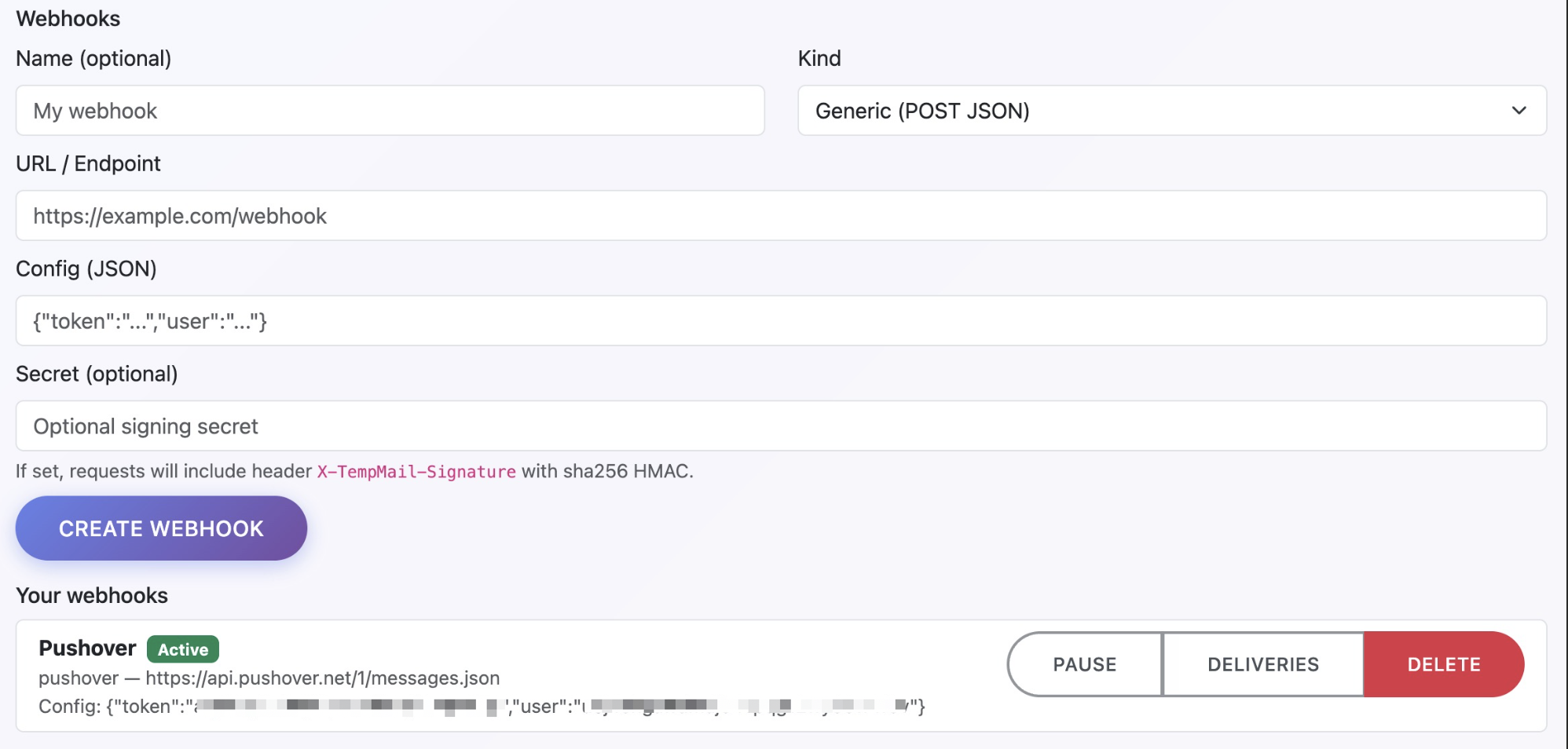
Add as many hooks as you need. Hook them up to Slack to see your TempMails in your feed, or use the preconfigured Pushover option if you prefer push notifications with a bit of flair.
Webhooks are available to everyone with a Pro account — head to Settings to set them up.
I hate a cluttered inbox
The main reason I built TempMail is simple: I hate cluttered inboxes almost as much as I hate spending time uncluttering them.
At one point I received somewhere between 10 and 50 emails per day. Beer requests from friends, questions from customers, newsletters, updates, spam, fun cat memes… you name it.
I had north of 30 inbox rules pushing emails into folders, tagging, highlighting, and color-coding everything according to every rule in the GTD book. Most nights I went to bed with a beautifully empty inbox—only to wake up to chaos and start the whole process again.
24 hours a day. 7 days a week. Basically The NeverEnding Story (1984), but with more newsletters.

TempMail services
I’ve been using temporary email services for years—testing things, downloading whitepapers, signing up for random stuff that requires an email “just this once.” And they work… reasonably well.
The main problem is that most temp email addresses expire after a few days. For some things that’s fine. For others, not so much.
What I really wanted was an inbox with only relevant emails. Out of those 10–50 daily emails, maybe 7% actually mattered. The rest? Stuff I might want to read one day, when I have time, and then forget about forever.
That’s not email. That’s a news feed.
The solution
So I built my own workaround.
TempMail uses semi-sticky email addresses that receive emails, convert them into a news feed, and automatically delete them after a while. All the “interesting but non-urgent” stuff gets pushed out of my main inbox and into TempMail, where I read it using any RSS reader.
Whenever I get an email from a “noreply” address or one with an “unsubscribe” link, I move the subscription from my main email to my TempMail address. Done. Gone.
If a sender doesn’t respect that? Straight to spam in my main inbox. Life’s too short.
The result
My inbox is now clean. I receive just a handful of emails per day, and managing them takes a minute or two. Nothing important gets buried under noise anymore.
And the memes and cat videos? I never miss a single one. They’re all neatly stacked in my RSS feed, ready to be consumed when I have a few spare minutes.
About 99.999% of the emails that land in TempMail require zero action from me. No replies. No tasks. No stress.
That remaining 0.001%? I’ve decided I can live without it.
Would you like to join the clean inbox tribe?
Head over to Pro (opens in new tab), hit Redeem, and use the code welcome26 to get 3 years of Pro access - with all the tools you need to finally stay ahead of your inbox.